Choosing a car charger in 2026 requires more than matching a phone brand with a plug. Devices now include smartphones, tablets, laptops, cameras, handheld consoles, and portable medical equipment. Each may demand different power levels, charging protocols, and cable standards. The International Energy Agency reported that global electric car sales exceeded 17 million in 2024, representing more than one-fifth of new-car sales. This growing connected-car environment makes reliable in-vehicle charging increasingly important.
The practical question is not simply, “How many watts does it provide?” It is “How to choose a car charger for different device types?” A modern smartphone may work well with 20W to 30W USB-C Power Delivery. A tablet often benefits from 30W or more. Some laptops require 65W, 100W, or higher, while gaming devices can draw power unevenly. USB-IF specifications and manufacturer testing remain useful references, especially for USB-C compatibility. However, wattage alone can mislead. A 100W charger may still charge slowly if its cable, port profile, or device protocol is unsuitable.
Safety deserves equal attention. Look for credible certification, over-current protection, thermal control, short-circuit protection, and a secure fit in the vehicle socket. UL Solutions and other recognized testing organizations emphasize these protections for power products. In real use, heat matters: a charger left beside a sunlit dashboard can become uncomfortable within minutes. I have found that compact designs are convenient, but smaller does not always mean better. Buyers should check independent reviews, warranty terms, cable quality, and actual charging performance before trusting a bold package claim.
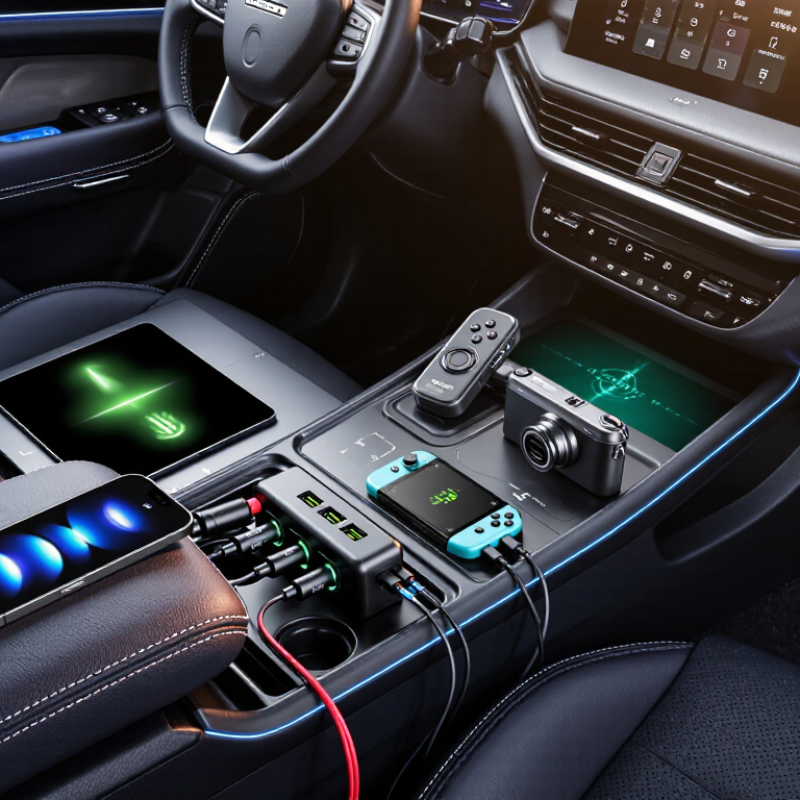
How to Choose a Car Charger for Any Device in 2026?
Understanding Car Charger Types and Device Compatibility
A car charger is not automatically suitable for every device. Traditional 12-volt socket chargers usually contain USB-A or USB-C ports. USB-A works with many older cables, while USB-C can support faster charging and newer devices. Check the charger’s output, not only its connector shape. A USB-C port may provide basic power or support USB Power Delivery, which adjusts voltage safely for compatible equipment.
Match the charger with your device’s requirements. A phone may need 18 to 30 watts, while a tablet or compact laptop can require 45 watts or more. Read the small print near the charging port or in the device manual. I have seen people buy a high-wattage charger, then use a weak cable that limits performance. The cable matters too. Some cables transfer power only, while others support charging and data.
Wireless charging is convenient, but alignment and heat can reduce its speed. A thick case may interrupt charging. In a parked car under strong sunlight, temperature becomes another concern. Choose a charger with over-current, over-voltage, and over-temperature protection. Independent safety testing offers stronger evidence than attractive packaging. I sometimes prefer a slower charger during long drives because it creates less heat. That choice is not always necessary, but it feels more dependable. Check the socket firmly, keep cables clear of pedals, and replace damaged accessories.
| Charger Type | Common Output Port | Typical Power Range | Compatible Devices | Charging Characteristics | Best Use Case | Important Selection Check |
|---|---|---|---|---|---|---|
| USB-A Car Charger | USB-A | 5 W to 18 W per port | Older smartphones, basic GPS units, wireless earbuds, fitness trackers, USB accessories and many rechargeable cameras | Usually supports standard 5 V charging. Faster charging depends on the device, cable and supported charging protocol. | Everyday charging for small USB devices | Check the device's required charging protocol and use a suitable USB-A cable. It is generally less versatile than USB-C for newer devices. |
| USB-C Power Delivery Charger | USB-C | 20 W to 100 W is common in vehicles; USB Power Delivery specifications can support higher levels with suitable equipment | Modern smartphones, tablets, handheld gaming devices, compact laptops, cameras and USB-C power banks | Negotiates voltage and current with the device instead of sending maximum power continuously. A device draws only the power it is designed to accept. | Fast, flexible charging for current USB-C devices | Match the charger's USB-PD profile and wattage to the device. A high-wattage charger does not force excess power into a compatible device. |
| Multi-Port USB-C and USB-A Charger | One or more USB-C ports plus USB-A ports | Approximately 30 W to 100 W total, depending on the model and port combination | Mixed collections of phones, tablets, headphones, cameras, power banks and other USB devices | Total output may be shared or reduced when several ports are used at the same time. The primary USB-C port often receives the highest available power. | Family trips and vehicles with several passengers | Review the per-port output and the combined-output table, not only the advertised maximum wattage. |
| 12 V Accessory-Socket Adapter | Built-in USB-A, USB-C or both | Usually up to about 100 W for compact consumer adapters | Most USB-powered devices, provided the output port and charging standard match the device | Converts the vehicle's nominal 12 V accessory-socket supply into regulated USB power. Actual vehicle voltage can vary while driving. | A simple replacement for a missing or inconvenient USB charging port | Confirm that the accessory socket is active when the vehicle is parked and check the adapter's fuse and thermal-safety specifications. |
| USB-C Laptop Car Charger | High-power USB-C | 45 W to 100 W is common; some specialized models provide more | USB-C laptops, tablets with keyboard accessories, portable monitors and high-capacity power banks | Can charge a laptop while it is in use when the charger supplies at least the device's required wattage. Intensive workloads may consume power faster than the charger can replace it. | Work and study during road travel | Compare the laptop's required input wattage with the charger's sustained output, and verify that the cable is rated for the intended power level. |
| Wireless Qi Car Charger | Integrated wireless charging surface | Typically 5 W to 15 W, depending on the phone, charger and wireless profile | Devices that support compatible Qi wireless charging | Transfers energy through an electromagnetic field. Charging is normally less efficient than wired charging and may slow down because of heat, alignment or a thick case. | Convenient charging with minimal cable handling | Check wireless-standard compatibility, phone alignment, case thickness and whether the mount remains stable on rough roads. |
| USB-C to USB-C Charging Setup | USB-C charger with a USB-C cable | Up to the lower limit of the charger, cable and device ratings | Most recent USB-C phones, tablets, laptops, cameras and power banks | Supports USB Power Delivery when both the charger and device implement it. USB-C describes the connector shape; it does not by itself guarantee fast charging. | New devices that use USB-C on both ends | Check the cable's current and power rating, especially above 60 W, and confirm that the charger supports the required USB-PD voltage profile. |
| USB-A to USB-C Charging Setup | USB-A charger with a USB-C cable | Usually 5 W to 18 W, depending on the charger and supported protocol | USB-C phones, headphones, controllers, power banks and other lower-power devices | Works with many USB-C devices, but may provide less power than a USB-C Power Delivery charger. The USB-A port can limit fast-charging capability. | Using existing USB-A vehicle chargers with newer USB-C devices | Verify the cable direction and the charger's supported output standard; do not assume every USB-A port provides USB-PD. |
| Inverter with AC Outlet | Household-style AC outlet, sometimes with USB ports | Approximately 100 W to 300 W for compact vehicle units; higher ratings require appropriate vehicle wiring | AC laptop chargers, camera chargers and selected low-power electronics | Converts vehicle DC power to AC power, adding conversion losses and heat. It is less efficient than using a direct USB-C charger when a USB-C input is available. | Devices that do not accept USB charging | Check continuous output, surge output, socket fuse capacity and ventilation. Avoid using it for heating appliances or other high-power loads unless specifically rated. |
| Dedicated Navigation or Dash-Camera Power Adapter | USB-A, USB-C or a device-specific connector | Commonly 5 W to 15 W | Dash cameras, navigation units, compact displays and other low-power vehicle accessories | Designed for continuous or semi-continuous operation rather than rapid battery charging. Some setups require a low-voltage cutoff for parked recording. | Permanent or semi-permanent vehicle accessories | Confirm connector size, voltage, polarity, cable length and whether the vehicle outlet remains powered after the ignition is turned off. |
General rule: Choose a charger whose connector, charging protocol and sustained wattage meet or exceed the device's requirements. The device controls how much power it accepts, while cable quality, temperature and simultaneous use of other ports can affect real charging speed.
No. Check the charger’s wattage and charging standard. Some USB-C ports provide only basic power. The connector alone proves little.
Many phones need about 18 to 30 watts. Confirm the requirement in the manual or near the charging port. More wattage does not force extra power into the device.
It can, if the charger and cable support the required output. Tablets and compact laptops may need 45 watts or more. Check voltage, amperage, and power profiles carefully.
Some cables transfer power slowly or support data only. A weak cable can limit a powerful charger. The label may not explain everything clearly.
It is convenient, but alignment affects performance. A thick phone case may interrupt charging. Heat can also reduce speed. A parked car in sunlight becomes much hotter than expected.
Read the vehicle manual for socket voltage and maximum wattage. A 120-watt socket should not receive a 180-watt adapter. Leave some power headroom. My rule is useful, but not perfect.
Look for over-current, over-voltage, and over-temperature protection. Independent safety testing provides stronger evidence than attractive packaging. Stop using a charger that smells hot or shows discoloration.
Connect it while the vehicle is parked and switched off. Keep cables away from pedals, steering controls, and hot surfaces. Push the plug firmly. It should not wobble.
Replace it after fraying, cracking, repeated disconnections, or unusual heat. Never charge a device with a swollen battery. Check the cable again after several drives. I sometimes underestimate this step.
Choosing the right car charger in 2026 starts with understanding the available charger types, connector requirements, and your device’s power needs. A basic adapter may be suitable for phones and small accessories, while tablets, handheld consoles, and laptops often require higher wattage and advanced charging standards. When considering how to choose a car charger for different device types, check the charger’s output ratings, supported protocols, port options, and compatibility with your vehicle’s power socket. Matching these specifications helps prevent slow charging, overheating, or unstable performance.
A reliable car charger should also include safety protections such as overcurrent, overvoltage, short-circuit, and temperature control. Energy efficiency, durable construction, compact design, and convenient cable management can improve everyday use. Before charging, inspect the cable and adapter, connect devices securely, and avoid covering the charger or using damaged accessories. Following the vehicle and charger instructions ensures safer, more efficient charging for phones, tablets, laptops, and other compatible devices.

 Laisen Electronic